Movie Wrap Cost Guide: Poster-to-Wrap Conversion, Photo Detail, and Print Sharpness


You may pay from $2,500 to $6,000 for a movie car wrap. The price changes because of different things. Here are some of the main reasons:
|
Factor |
Description |
|---|---|
|
Vehicle Size and Type |
Bigger cars cost more to wrap. |
|
Material Quality |
Better vinyl makes the price go up. |
|
Design Complexity |
Harder designs need more time and skill. |
|
Location and Vendor |
Prices change by place and who does the work. |
Good image quality and sharp prints help your wrap look great. This Movie Wrap Cost Guide shows what changes the price and how your wrap turns out.




Key Takeaways
-
You will pay between $2,500 and $6,000 for a movie car wrap. The price depends on how big your car is and how hard the design is.
-
Pick high-quality vinyl if you want your wrap to last longer and look bright. It may cost more at first, but it is worth it.
-
Think about your car’s shape and size. Bigger cars and tricky shapes make the wrap cost more.
-
Ask your installer for a full quote. This helps you know all the costs. Installation fees can be from $1,000 to $5,000.
-
Use high-resolution images with at least 150 DPI. This makes your wrap prints look sharp and not blurry.
-
Choose between decals and full wraps based on your money plan. Decals cost less but cover less of your car.
-
Clean your car and fix any damage before wrapping. This helps the wrap stick better and last longer.
-
Look at different providers. Find the best mix of price, quality, and service for your movie wrap.
Movie Wrap Cost Guide
Average Cost Range
You may wonder how much you will pay for a movie wrap. The movie wrap cost guide shows that prices change based on the type of vehicle you have. Smaller cars cost less, while luxury vehicles cost the most. Here is a table to help you compare the average cost for different vehicle types:
|
Vehicle Type |
Average Cost |
|---|---|
|
Small car |
$1,800–$2,500 |
|
Hatchback |
$2,800–$3,500 |
|
Convertible |
$2,800–$4,000 |
|
Sedan |
$3,000–$4,500 |
|
Small SUV |
$3,200–$4,500 |
|
Large SUV/Sedan |
$3,500–$5,000 |
|
Pickup Truck |
$3,200–$5,000 |
|
Small Van |
$3,000–$4,500 |
|
Large Van |
$3,200–$4,500 |
|
Luxury Vehicle |
$5,500–$10,000 |
You can see that the cost for sedans usually falls between $3,500 and $5,000. SUVs and trucks often range from $4,000 to $6,500. The movie wrap cost guide helps you plan your budget before you start.
Pricing Factors
Many things change the price of vehicle wraps. The movie wrap cost guide explains these factors so you can make smart choices.
-
Vehicle Size: Bigger vehicles need more vinyl. This means you pay more for large SUVs, vans, and trucks. The shape of your vehicle also matters. Curves and edges make the job harder for the installer, which can raise the cost.
-
Vinyl Quality: High-quality vinyl costs more. It lasts longer, keeps colors bright, and protects your wrap from the sun. You may pay more at first, but you save money because you do not need to replace the wrap as often.
-
Design Complexity: Simple designs cost less. If you want a detailed movie scene or many colors, the price goes up. The installer spends more time making sure every part looks perfect.
-
Location: Where you live changes the price. In big cities, you may pay 15% to 30% more than the national average. Rural areas often have lower labor costs, but you may find fewer skilled installers.
-
Installer Skill: A skilled installer can make your wrap look smooth and sharp. You may pay more for an expert, but you get better results.
Tip: Ask your installer about the type of vinyl and their experience with movie wraps. This helps you get the best value for your money.
Installation Fees
You need to think about installation when you look at the movie wrap cost guide. Installation fees for vehicle wraps usually range from $1,000 to $5,000 or more. The price depends on the size of your vehicle, the design, and where you live.
Here is a table that shows how installation fees can change by region:
|
Region Type |
Price Variation |
|---|---|
|
Major Cities |
+15% to +30% above national average |
|
Mid-Sized Cities |
Moderate pricing with skilled installers |
|
Rural Areas |
Lower labor costs, fewer certified shops |
You should always ask for a full quote. This way, you know the total cost before you start. The movie wrap cost guide helps you understand every part of the process, from choosing your vehicle to picking the right installer.
Car vs. Wall Wrap
You may wonder how car wraps compare to wall wraps. Both options use vinyl to create bold designs, but they serve different purposes and have unique cost factors. When you choose a wrap for your vehicle, you need to think about the shape, size, and surface. A car has curves, mirrors, and handles. These features make installation more complex than a flat wall.
Here is a table that shows the main factors that cause price differences between car wraps and wall wraps:
|
Factor |
Description |
|---|---|
|
Vehicle Size and Body Complexity |
Larger vehicles require more material, increasing costs. Complex shapes need more skilled labor. |
|
Vinyl Material Quality and Finish |
Higher quality vinyl lasts longer and maintains appearance, affecting overall cost. |
|
Design and Customization |
More intricate designs and custom graphics increase both material and labor costs. |
You will see that a vehicle wrap often costs more than a wall wrap. The reason is simple. A vehicle has many curves and edges. The installer must stretch and shape the vinyl to fit every part. This process takes more time and skill. A wall wrap usually covers a flat surface. The installer can apply the vinyl faster and with less effort.
You also need to think about the type of vinyl. Car wraps use special materials that can handle sun, rain, and road debris. These wraps must stay bright and smooth even after years of driving. Wall wraps do not face the same challenges. You can use a different type of vinyl for indoor walls, which lowers the cost.
Design plays a big role in the final price. If you want a custom movie scene or a detailed graphic, the installer will spend more time on your wrap. Both car and wall wraps can show sharp images, but a vehicle wrap needs extra care to keep the design clear on curved surfaces.
Tip: Always ask your installer about the best vinyl for your project. The right material helps your wrap last longer and look better.
You can use wraps to show off your favorite movie, promote a business, or add style to your space. When you compare car wraps and wall wraps, remember to look at the surface, the material, and the design. This helps you choose the best wrap for your needs.
Customization & Design Pricing
Movie Character Wrap Price
You may want your favorite movie character on your car. The price for a movie character wrap depends on how much of your vehicle you want to cover and the size of your car. Here are some common price ranges:
-
Partial wrap for a small car: $800 to $2,000
-
Full wrap for a standard sedan: $3,500 to $5,000
-
Larger vehicles (SUVs or trucks): $4,500 to $6,000
-
DIY Itasha vinyl wrap kits: $200 to $1,400
If you choose a full wrap, you pay more because it covers the entire vehicle. A partial wrap costs less and only covers part of the car. DIY kits are the cheapest, but you need skill to install them well.
The complexity of your movie character design also changes the price. You pay more for detailed artwork or special effects. The table below shows how different factors affect the final cost:
|
Factor |
Description |
|---|---|
|
Level of Detail |
More intricate designs require more time and resources, increasing costs. |
|
Number of Polygons |
Higher polygon counts lead to more detailed and complex designs, which are more expensive. |
|
Character’s Backstory |
A well-developed backstory needs a deeper understanding, impacting design complexity. |
|
Working Hours |
More complex designs typically require more working hours, leading to higher overall costs. |
Tip: If you want a simple design, you can save money. Complex designs with many colors or effects cost more.
Anime Car Wrap
Anime car wrap styles have become popular with fans who want to show off their favorite characters or scenes. You can choose from entry-level kits or premium cast wrap films. Here are the typical prices:
-
Full anime red wrap kits: $150 to $400
-
Entry-level calendared kits: about $150
-
Premium cast vinyl options: over $350
The price for an anime car wrap depends on the type of vinyl and the level of customization. If you want a full-vehicle anime car wrap with custom artwork, you pay more. Custom designs need more time and skill. Installers must place the images perfectly on your car. This makes the process more expensive than using a pre-made kit.
Custom anime car wraps often feature original art and special effects. Skilled installers make sure the wrap fits your car’s shape. The labor cost goes up if the design is complex. You get a unique look, but you pay more for the extra work.
Cinematic Wrap Design
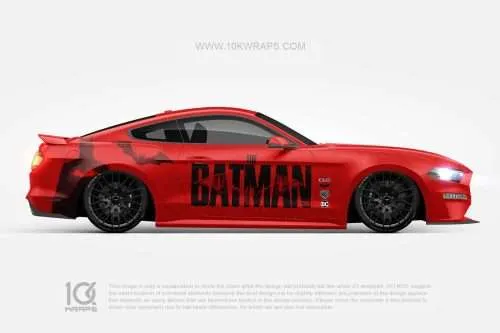
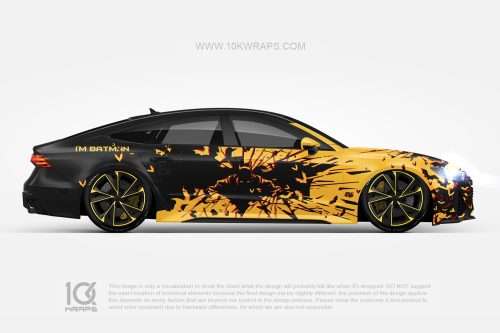
Cinematic wrap designs let you turn your car into a moving movie poster. These wraps use high-quality images and bold graphics. The price for a cinematic wrap design depends on the size of your vehicle, the quality of the vinyl, and the detail in the artwork. You pay more for premium cast wrap films because they last longer and keep colors bright.
If you want a simple cinematic design, you can choose a basic kit. For a custom design with detailed scenes or characters, you pay more for both design and installation. Always ask your provider for a quote based on your ideas and the type of vehicle you have.
Decal vs. Full Wrap
When you want to add movie graphics to your car, you can choose between decals and full wraps. Each option has its own benefits and costs. You should know the differences before you decide.
A decal is a sticker or graphic that covers a small part of your car. You can use decals to show a movie logo, a character, or a simple design. Decals work well if you want to add style without spending a lot of money. You can place them on doors, hoods, or windows. Most people choose decals for targeted customization.
A full wrap covers your entire car with vinyl. This option lets you turn your vehicle into a moving movie poster. You can use a full wrap to show detailed scenes, large characters, or complex backgrounds. Full wraps give you more space for creativity. They also protect your car’s paint from scratches and sun damage.
The cost difference between decals and full wraps is important. You can see the main differences in the table below:
|
Type of Graphic |
Cost Range (Approx.) |
Description |
|---|---|---|
|
Full Wrap |
Comprehensive coverage, higher installation complexity. |
|
|
Decal |
£50 – £800 |
Budget-friendly, targeted customization, lower cost. |
You pay much less for decals. They cost between $65 and $1,000. Full wraps cost more because they cover the whole car and need more time to install. You may pay from $1,500 to $3,500 for a full wrap. The price can change based on the size of your car and the design you choose.
If you want to save money, decals are a smart choice. You can add a movie theme without a big investment. If you want your car to stand out and show a full scene, a wrap is the best option. You get a bold look and extra protection for your car.
Tip: Think about your budget and your design goals. Decals work well for simple graphics. Full wraps are better for complex movie scenes.
You should also ask your installer about the quality of the vinyl. High-quality vinyl makes both decals and wraps last longer and look sharper. Good installers use the right tools to make sure your graphics stay smooth and clear.
When you compare decals and full wraps, look at your needs and your budget. Both options let you show your love for movies in your own way.
Photo Detail & Source Quality
Image Resolution
You want your movie wrap to look sharp and clear. The first step is to choose a source image with high resolution. High-resolution images give you high-quality prints. If your image is blurry or too small, the final wrap will not look good. For large format printing, you need an image that is at least 150 DPI (dots per inch) at the final size. For example, if your wrap will cover a car door that measures 60 inches wide, your image should be at least 9,000 pixels wide. This helps you avoid pixelation and keeps details crisp.
Tip: Always ask your provider what resolution they need for large format printing. This ensures your wrap will have high-quality prints.
Crop Rules
You must follow crop rules when you prepare your image. Cropping means cutting away parts of the image that you do not need. If you crop too much, you might lose important details. If you do not crop enough, you might see unwanted edges or backgrounds on your wrap. For high-quality prints, keep the main subject in the center of the image. Leave extra space around the edges. This gives the installer room to adjust the image during large format printing.
Here is a simple checklist for cropping:
-
Keep faces and key details away from the edges.
-
Leave at least 2 inches of extra space on all sides.
-
Check that the main subject stays in the safe zone.
If you follow these crop rules, you help your installer create high-quality prints that look great on your vehicle.
Skin Tone
Skin tone accuracy is important for movie wraps with people or characters. You want the print to show natural and true-to-life colors. If the skin tone looks too red, yellow, or blue, the wrap will not look realistic. High-quality prints depend on good color correction. Before large format printing, check your image on a color-calibrated screen. Ask your provider to do a test print if you are not sure about the colors.
Note: Good installers use color management tools to keep skin tones accurate during large format printing. This step helps you get high-quality prints every time.
When you pay attention to image resolution, crop rules, and skin tone, you get a wrap with the best possible quality. These steps make sure your movie wrap stands out with sharp details and vibrant colors.
Dark Scene Printing
Printing dark scenes on a movie wrap can be tricky. You want your wrap to show every detail, even in the shadows. If you use a low-quality image or the wrong printing method, faces and backgrounds can look muddy or lose important details. You need to know how to handle dark scenes so your wrap looks sharp and professional.
Dark scenes often have deep shadows and low contrast. These areas can hide small details. When you print them on vinyl, the darkness can become even stronger. This makes it hard to see faces, costumes, or background elements. You may also notice color shifts or banding if the printer does not use the right settings. To avoid these problems, you must start with a high-quality image. Make sure your photo has enough brightness and detail in the dark areas.
Printing dark scenes usually costs more than printing bright images. The printer uses more ink to create rich blacks and smooth gradients. High-quality vinyl and advanced printers help keep the colors true and the details clear. You may pay extra for color correction or test prints. These steps help you see how the final wrap will look before you print the whole design.
You can use special techniques to keep details in dark scenes. Here are some methods that professionals use:
-
Flashing Technique: This method adds a small amount of light, called a “flash,” to the image. For example, a 10% flash can brighten shadows without making the whole image lighter. This helps you see more detail in dark areas.
-
Overexposure and Development Adjustment: Sometimes, you can overexpose the image by a few stops and then adjust the development time. For example, overexposing by three stops, adding a 35% flash, and cutting the development time in half can keep both highlights and shadows clear. This method helps you balance the bright and dark parts of your image.
Tip: Always ask your provider for a proof or test print, especially if your design has a lot of dark areas. This lets you check the detail and color before you print the full wrap.
You should also talk to your installer about the type of vinyl and printer they use. High-quality materials and skilled printing make a big difference in dark scene wraps. If you want the best results, choose a provider who understands how to handle shadows and fine details.
Printing dark scenes takes extra care and sometimes costs more, but the results can be stunning. With the right image, materials, and printing techniques, your movie wrap will show every detail—even in the darkest scenes.
Print Sharpness & Technology

Printing Methods
You want your movie wrap to look sharp and vibrant. The printing method plays a big role in how your wrap turns out. Different printing technologies can change the way your design appears on vinyl. DTF printing technology stands out because it produces vibrant, high-quality prints with exceptional detail. This method helps your wrap show every small feature, making the images pop. Higher resolution images allow you to print larger designs while keeping them sharp. The right printing method ensures your wrap looks great from every angle.
When you choose a provider, ask about their printing equipment. Some printers work better for large graphics, while others handle fine details. The best providers use advanced machines that keep colors bright and lines crisp. Viewing distance also matters. A print from a 3-megapixel camera can look sharp when you stand at a distance of twice its longer side. This means you get the best results when you match the image resolution to the size of your wrap.
Ensuring Sharpness
Sharpness makes your movie wrap stand out. You want every detail to be clear, from faces to backgrounds. To achieve this, start with a high-resolution image. The installer experience also matters. Skilled installers know how to line up the graphics and avoid stretching or blurring. They use special tools to smooth the vinyl and keep the print quality high.
You should check the print quality before the wrap goes on your car. Look at a sample or proof. Make sure the lines are crisp and the colors match your design. If you see any blurring or fading, ask for adjustments. A pro-level install will keep your wrap looking sharp for years.
Tip: Always ask for a test print if you care about small details. This step helps you see the final result before installation.
Quality Control
Quality control steps help you get a professional result. Providers follow a checklist to make sure your wrap meets high standards:
-
Check for color accuracy. The finished wrap should match your original design.
-
Inspect for defects. Look for fade spots, blurring, or any printing issues.
-
Evaluate adhesion. Stretch the vinyl slightly to confirm the design stays sharp and does not peel.
You want quality installs that last. Good providers use these steps to catch problems early. They fix any issues before the wrap goes on your car. This process gives you peace of mind and a wrap that looks great on the road.
Note: Always choose a provider with strong quality control. This ensures your movie wrap keeps its sharpness and color over time.
Cost-Saving Tips
Material Choices
You can save money by picking the right vinyl. Each vinyl type has a different price and lasts a different time. Calendered vinyl is the cheapest. It works best on flat areas but does not last long. Hybrid vinyl films cost more but last longer than calendered. They are good for medium-difficult jobs. Cast-conforming vinyl costs the most. It lasts the longest and works well on curves. You should choose the material that fits your needs and budget. This way, you get good printing without spending too much.
|
Material Type |
Cost |
Durability |
Notes |
|---|---|---|---|
|
Calendered Vinyl |
Most Economical |
Shorter lifespan (3-5 years) |
Best for flat surfaces, but less durable and prone to shrinking. |
|
Hybrid Vinyl Films |
Middle Ground |
Better than calendered |
A compromise between cost and performance, good for moderate complexity. |
|
Cast-Conforming Vinyl |
Higher Cost |
Most Durable |
Ideal for full wraps, offers exceptional performance and longevity. |
Standard Sizes
Picking standard sizes helps you save money. Many shops have set sizes for cars and walls. Using these sizes means less waste and lower costs. You do not pay extra for custom cuts. This makes the job faster and cheaper. Ask your provider about standard sizes before you order. Printers use their materials better with standard sizes, so printing costs less.
Tip: Measure your car or wall carefully. Choose the closest standard size to avoid paying more for custom work.
Image Preparation
Getting your surface ready saves money and makes your wrap look better. Follow these steps before you print:
-
Clean off all dirt and dust from the surface.
-
Remove oils, wax, and glue with a gentle cleaner.
-
Wipe the area with isopropyl alcohol and a lint-free cloth.
-
Use a primer or sealer on rough or bumpy spots.
-
Fix any rust or small damage before wrapping.
-
Make sure paint is dry and works with the wrap’s glue.
A clean, smooth surface helps the wrap stick well. This stops problems during installation. You will not need to fix or redo the wrap, so you save money. Good prep also helps your wrap last longer and look great.
Provider Comparison
You want your movie wrap to be a good deal. Comparing providers helps you save money and avoid trouble. Each provider has different prices, services, and quality. You should look at a few things before picking one.
First, check how much experience the provider has. Ask how many wraps they have done. Look at photos of their past work. This shows if they know about movie car wrap cost, movie character wrap price, and cinematic wrap design pricing. Providers with more experience usually do a better job.
Next, look at the materials each provider uses. Some use calendered vinyl, and others use cast-conforming vinyl. Ask how long the vinyl lasts and how bright the colors are. You want your wrap to last and look good. High-quality vinyl costs more, but it gives you better protection and brighter colors.
You should also ask about their printing technology. Good providers use advanced printers for sharp images. This stops faces from looking blurry and keeps details clear. Ask if you can see a test print or proof. This lets you check if the image is sharp enough. If you want dark scenes, ask how they fix colors. Providers who know about skin tone and crop rules give you a better result.
Compare installation fees and what is included. Some providers clean and prep the car for free. Others charge extra for these steps. Ask for a full quote. Make sure you know what you are paying for. You can use a table to help compare:
|
Provider Name |
Material Type |
Printing Tech |
Experience |
Price Range |
Extras Included |
|---|---|---|---|---|---|
|
Provider A |
Cast Vinyl |
DTF Printer |
10+ years |
$3,000-$5,000 |
Surface Prep |
|
Provider B |
Hybrid Vinyl |
Eco-Solvent |
5 years |
$2,500-$4,500 |
Test Prints |
|
Provider C |
Calendered |
Basic Inkjet |
3 years |
$2,000-$3,500 |
None |
This table helps you see which provider gives you the best mix of price, quality, and service.
Tip: Always read reviews and ask for references. This helps you learn if the provider is reliable and nice to customers.
Ask about warranties and aftercare. Some providers promise their wraps will last. You want to know how long your wrap will look good and what happens if there are problems.
You can visit provider websites or shops to see samples. Ask questions about movie wrap cost, image resolution, and installation. Providers who answer clearly and show proof of good work are usually trustworthy.
Comparing providers takes time, but it helps you get the best deal. Your wrap will look great and last longer. You also avoid hidden costs and bad quality.
Ordering Process
Steps to Order
You can turn your favorite movie poster into a custom wrap by following a clear process. Here are the main steps you will take:
-
Find a provider who can print and install movie wraps. You can check out [PP], [CD], [MOVIES], or [SHOP] for options.
-
Share your design or poster with the provider. Make sure your image has high resolution for the best results.
-
Choose the vinyl type that fits your needs and budget. Ask about the cost and how long the vinyl will last.
-
Prepare your car by cleaning the surface. Remove any dirt, wax, or glue. Fix any small damage before you start.
-
Take off mirrors and molding if needed. This helps the wrap fit better and look smooth.
-
Work with the provider to plan the installation. Decide on the design layout and check the proof before printing.
-
Drop off your car at the shop or arrange for mobile installation.
-
The installer will stick the vinyl on your car, stretch it out, and trim the edges.
-
The installer checks the seams and finishes the details.
-
Inspect the finished wrap with the provider to make sure you are happy with the result.
Tip: Ask for a test print if you want to see how your design will look before the full wrap goes on.
Timeline
You may wonder how long the whole process takes. The timeline for a custom movie wrap usually looks like this:
|
Stage |
Timeframe |
|---|---|
|
Initial Inquiry and Estimate |
|
|
Approval, Booking, and Drop Off |
A few days to a week |
|
Installation |
1 to 2 days (partials) |
|
|
2 to 4 days (full wraps) |
You can speed up the process by preparing your image and car ahead of time. If you need a special design or have a large vehicle, the timeline may be longer. Always ask your provider for an estimated finish date.
Delivery
After installation, you will pick up your car or have it delivered to your location. Here is what you should expect:
-
Inspect the wrap for sharpness and color before you leave the shop.
-
Ask about aftercare instructions to keep your wrap looking new.
-
Some providers offer a short warranty for their work.
-
Save your provider’s contact information in case you have questions later.
You should check the wrap for any issues right away. If you see a problem, talk to the installer before you drive home. This helps you get the best value for your cost and keeps your wrap looking great.
For more details about providers, designs, or ordering, you can visit [PP], [CD], [MOVIES], or [SHOP].
Useful Links
You want to make smart choices when ordering a movie wrap. Helpful resources guide you through each step. The following links give you access to trusted providers, design inspiration, and technical advice. You can use these links to compare prices, check quality standards, and find answers to common questions.
Quick Access Table
|
Link Name |
What You Find |
Why It Helps |
|---|---|---|
|
[PP] |
Provider profiles, wrap galleries, FAQs |
Learn about movie car wrap cost and see real examples. |
|
[CD] |
Custom design services, image prep guides |
Get tips on crop rules, skin tone, and resolution needs. |
|
[MOVIES] |
Movie-themed wrap inspiration, character pricing |
Explore movie character wrap price and cinematic wrap design pricing. |
|
[SHOP] |
Material options, ordering tools, aftercare info |
Compare vinyl types, photo wrap cost, and find care instructions. |
How to Use These Links
-
Visit [PP] to see provider portfolios. You can check their experience and see how they handle movie wraps. Look for sharp images and clear details in their galleries.
-
Use [CD] for design help. You find guides on preparing your image, following crop rules, and keeping skin tones accurate. You also learn what resolution you need for large prints.
-
Browse [MOVIES] for creative ideas. You see examples of wraps with movie characters and cinematic scenes. This helps you understand movie character wrap price and what goes into complex designs.
-
Go to [SHOP] to compare materials. You find information about calendered, hybrid, and cast vinyl. You also see ordering tools and aftercare tips to keep your wrap looking new.
Tip: Always check the FAQ sections on these sites. You find answers to questions like “Will faces blur?” and “What resolution do I need?” This helps you avoid mistakes and get the best results.
Common Questions Answered
-
Will faces blur on my wrap?
You avoid blurring by using high-resolution images and following crop rules. Providers listed on [PP] and [CD] offer advice and test prints. -
What resolution do I need?
For sharp prints, your image should be at least 150 DPI at the final size. Guides on [CD] explain how to check and prepare your files.
Extra Resources
-
Find cost calculators on [SHOP] to estimate movie car wrap cost and photo wrap cost.
-
Use design templates from [CD] to plan your wrap layout and avoid cropping errors.
-
Read aftercare guides on [SHOP] to learn how to protect your wrap from sun and weather.
You can use these links to make your ordering process easier. You get expert advice, compare prices, and see real examples. This helps you get a wrap that looks sharp and lasts a long time.
You need to think about every cost before you order a movie wrap. Vehicle size, vinyl type, and design all change the cost. High-quality images and sharp prints help you avoid extra cost from mistakes. Always check the cost with different providers. Use this checklist:
-
Prepare high-resolution images.
-
Follow crop rules and check skin tone.
-
Ask about dark scene printing costs.
-
Compare providers for the best value.
Careful planning helps you get the best wrap for your cost.
FAQ
Will faces blur on my movie wrap?
You will not see faces blur if you use a high-resolution image. Always choose clear, sharp photos. Ask your provider for a test print to check the details before printing the full wrap.
What image resolution do I need for a sharp wrap?
You need at least 150 DPI at the final print size. For a car door, use an image that is at least 9,000 pixels wide. Higher resolution gives you crisp, clear results.
How do I prepare my image for the best print quality?
Keep the main subject in the center. Leave extra space around the edges. Clean up any dust or marks on your digital file. Follow crop rules to avoid losing important details.
Can I use any photo for my wrap?
You should use high-quality, original images. Avoid low-resolution or blurry photos. If you use copyrighted movie posters, get permission first. Providers may reject images that do not meet quality standards.
How long does a movie wrap last?
A movie wrap can last 3 to 7 years. The lifespan depends on the vinyl type, weather, and how you care for your car. Cast vinyl wraps last the longest and keep colors bright.
What is the difference between a decal and a full wrap?
A decal covers a small area, like a logo or character. A full wrap covers the whole car with your design. Decals cost less and install faster. Full wraps give you more space for creative designs.
How do I care for my wrapped car?
Wash your car by hand with mild soap. Avoid high-pressure washers and harsh chemicals. Park in the shade when possible. This keeps your wrap looking new and bright.
Does dark scene printing cost more?
Yes, printing dark scenes may cost more. Printers use extra ink for deep blacks and smooth gradients. You may also pay for color correction or test prints to keep details clear.